netManager app icon

Built for macOS · Liquid Glass

Your network.
One beautiful command center.

netManager brings SSH, SFTP, SCP and FTP together with eight native network tools — in a fast, encrypted, iCloud-synced Mac app designed for network engineers.

macOS 26.6 or later · Free of tracking · iCloud sync optional

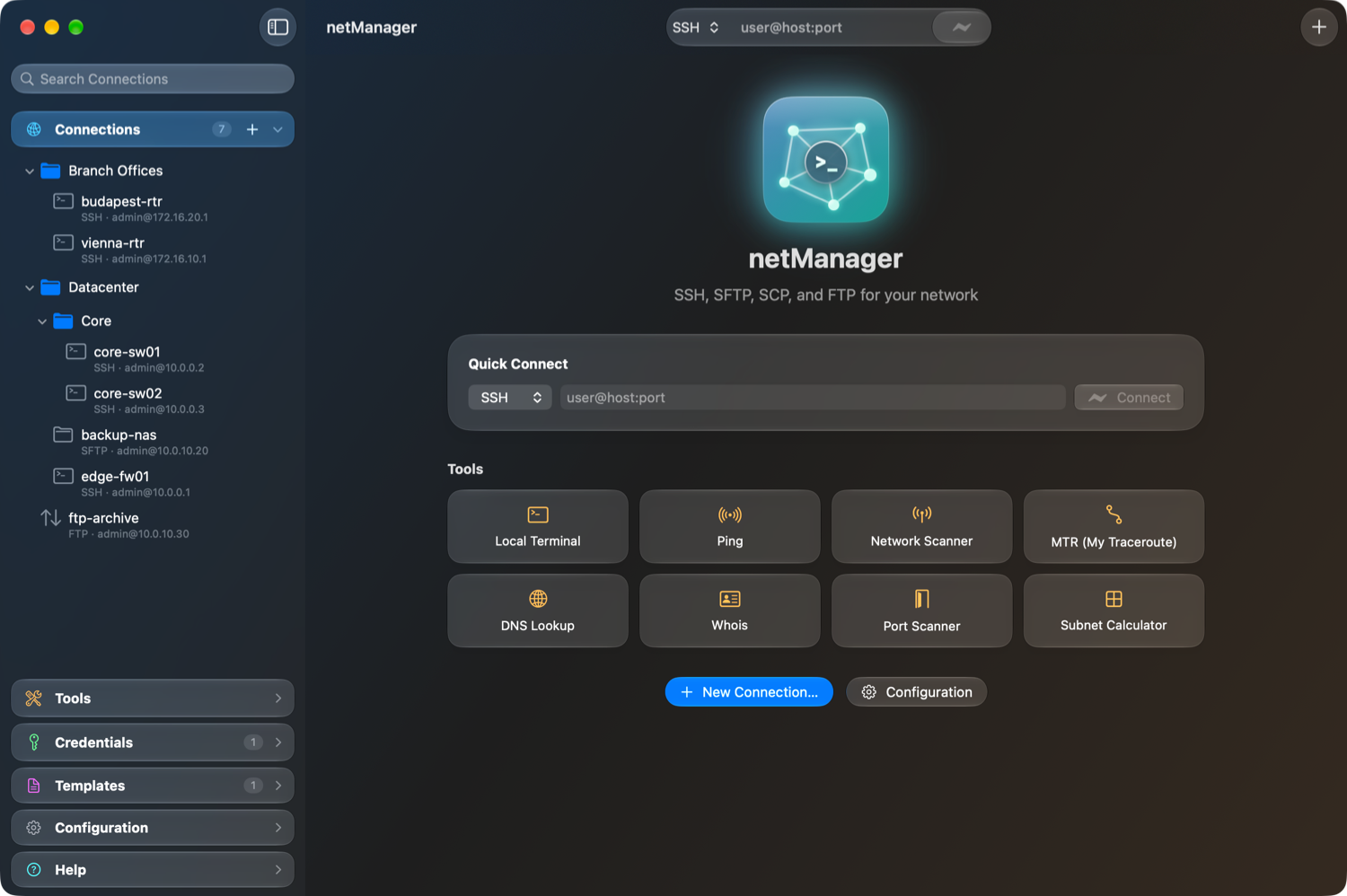
The netManager window: a Liquid Glass sidebar with nested connection folders, and the start page with Quick Connect and eight network tools.
  • SSH
  • SFTP
  • SCP
  • FTP
  • ICMP
  • MTR
  • DNS
  • WHOIS
  • OpenSSH
  • xterm-256color
  • CloudKit
  • AES-256-GCM
  • Touch ID
  • Liquid Glass

The film

Thirty-six seconds.
Your whole network.

Every frame below is the real app — rendered straight from netManager.

0:00

Features

Everything you reach for.
In one window.

A real terminal. Not a toy.

A full xterm-256color emulator on top of the OpenSSH that ships with macOS — so your keys, SSH agent, ~/.ssh/config, jump hosts and port forwarding (local, remote, SOCKS) simply work.

  • Logs in for you — answers the password prompt once, never at enable
  • Session logging, find, font zoom, reconnect with ⌘R
  • Templates sent line by line, with delays for slow devices
Legacy gear, welcome.

One switch enables SHA-1 key exchange, ssh-rsa and CBC ciphers for older switches, routers and firewalls — only the ones your OpenSSH actually supports, so connections never fail on an unknown algorithm.

Files, side by side.

A two-pane SFTP, SCP and FTP browser with drag and drop, a transfer queue, rename, permissions and recursive folders. SFTP and SCP share one login through OpenSSH multiplexing.

Organized your way.

Folders up to five levels deep for connections, credentials and templates. Drag and drop, instant search, and an accordion sidebar where every section stays in reach.

Tabs for everything.

Every session, file browser and tool opens in a Liquid Glass tab with a live status dot. Jump with ⌘1–⌘9, duplicate, reorder, or close safely with a confirmation.

Templates.

Save the commands you type every day and send them to any session in one click — line by line, with an optional delay for devices that drop fast input.

Quick Connect.

Type user@host:port, pick SSH, SFTP, SCP or FTP, press Return. No saving required — perfect for the device you'll only touch once.

Designed for macOS.

Liquid Glass throughout, light and dark appearance, SF Symbols, six terminal color themes, and a fully resizable window. It feels like it came with your Mac.

Terminal themes

Make the terminal
yours.

Six hand-tuned color schemes with full 16-color ANSI palettes. Pick one — the preview uses the exact colors from the app.

Network tools

Eight tools.
Zero terminal gymnastics.

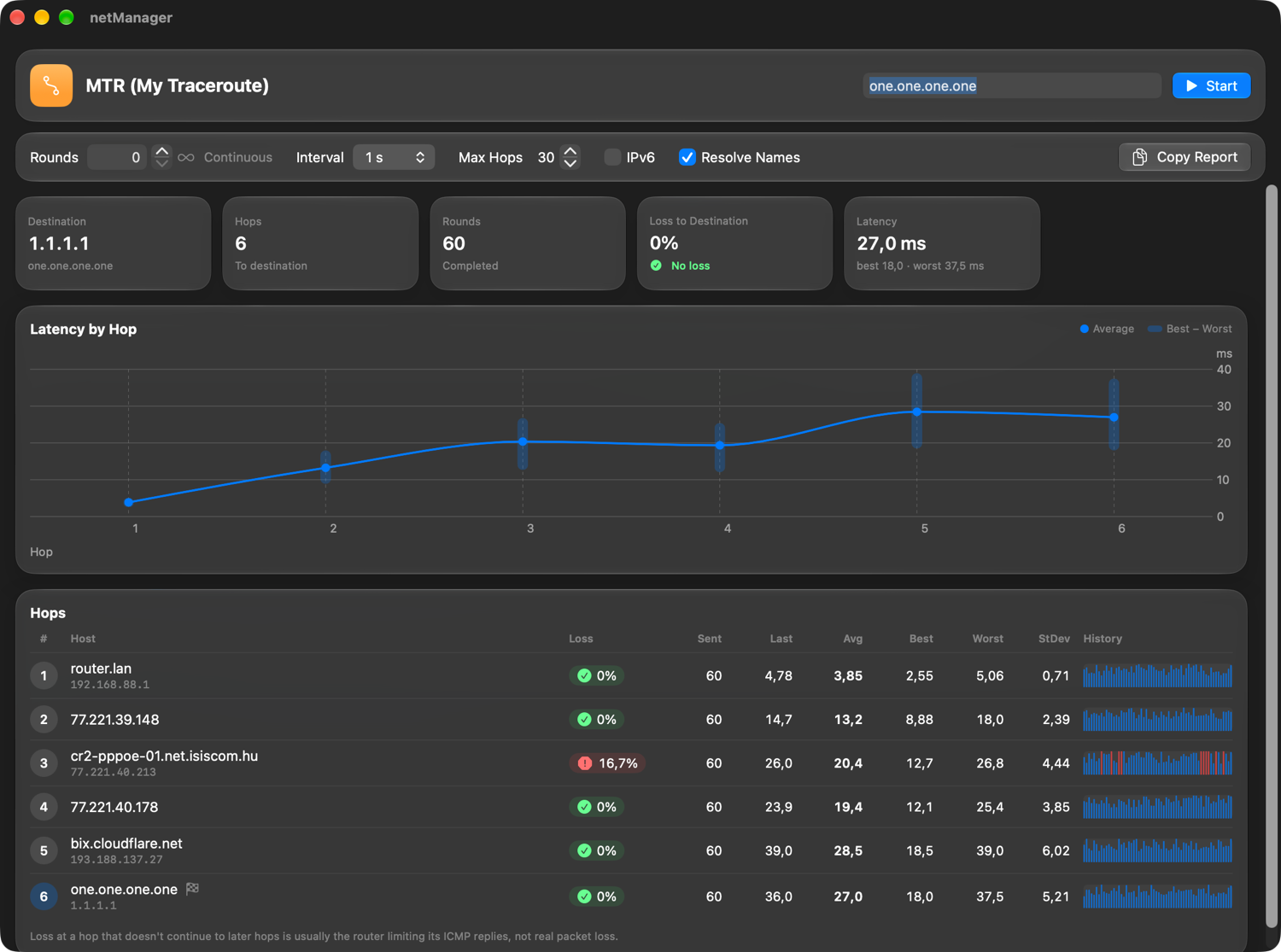
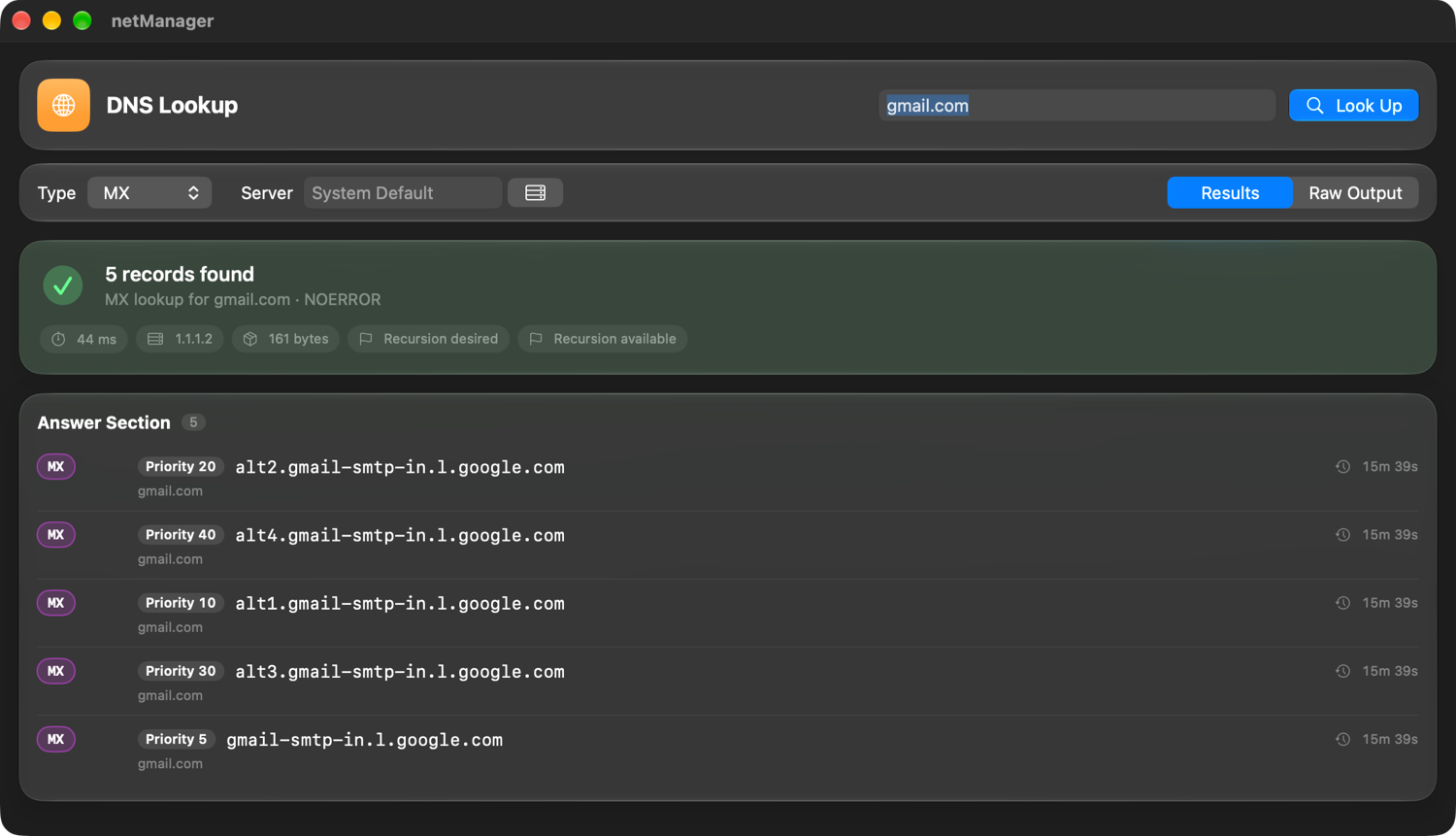
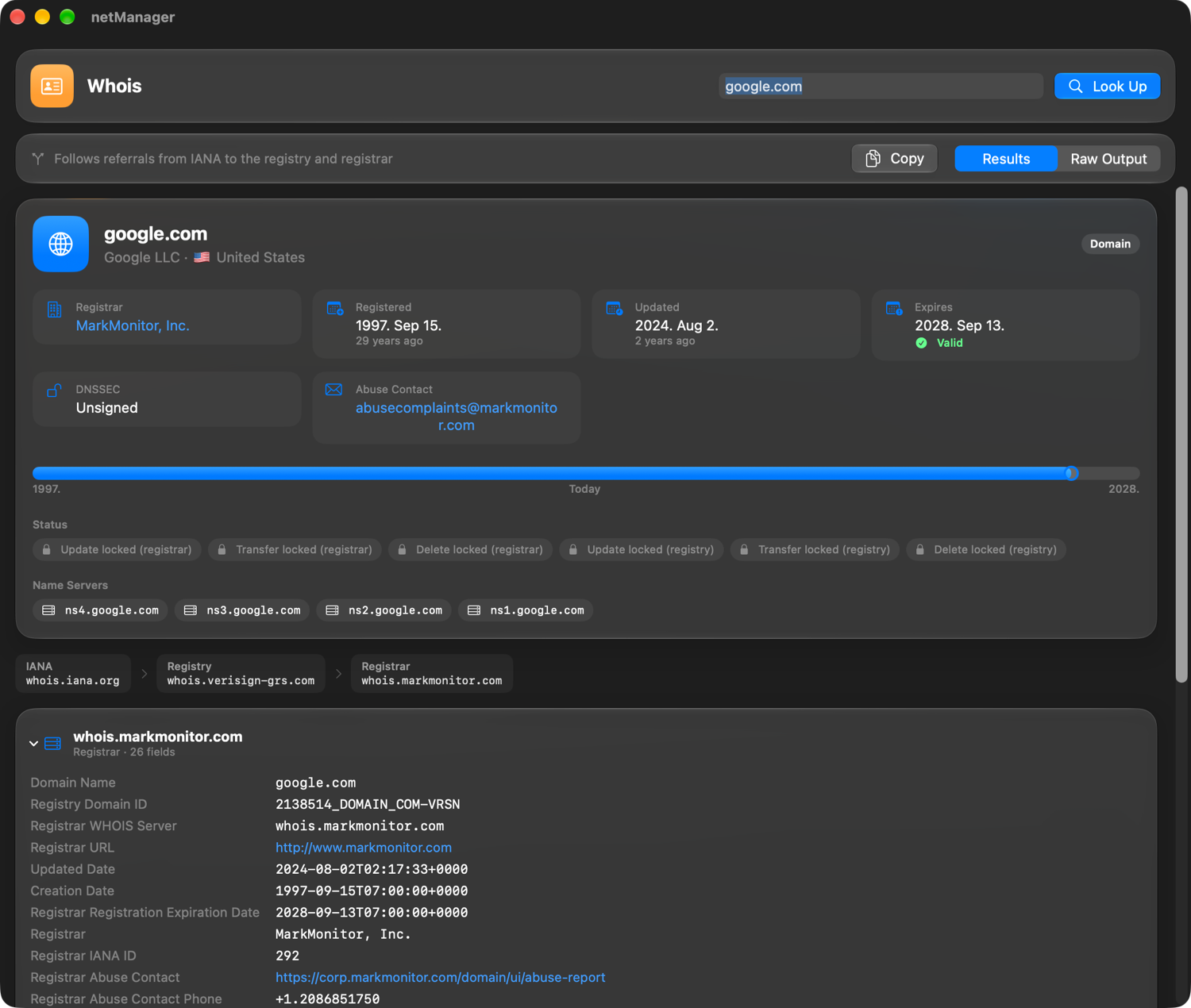
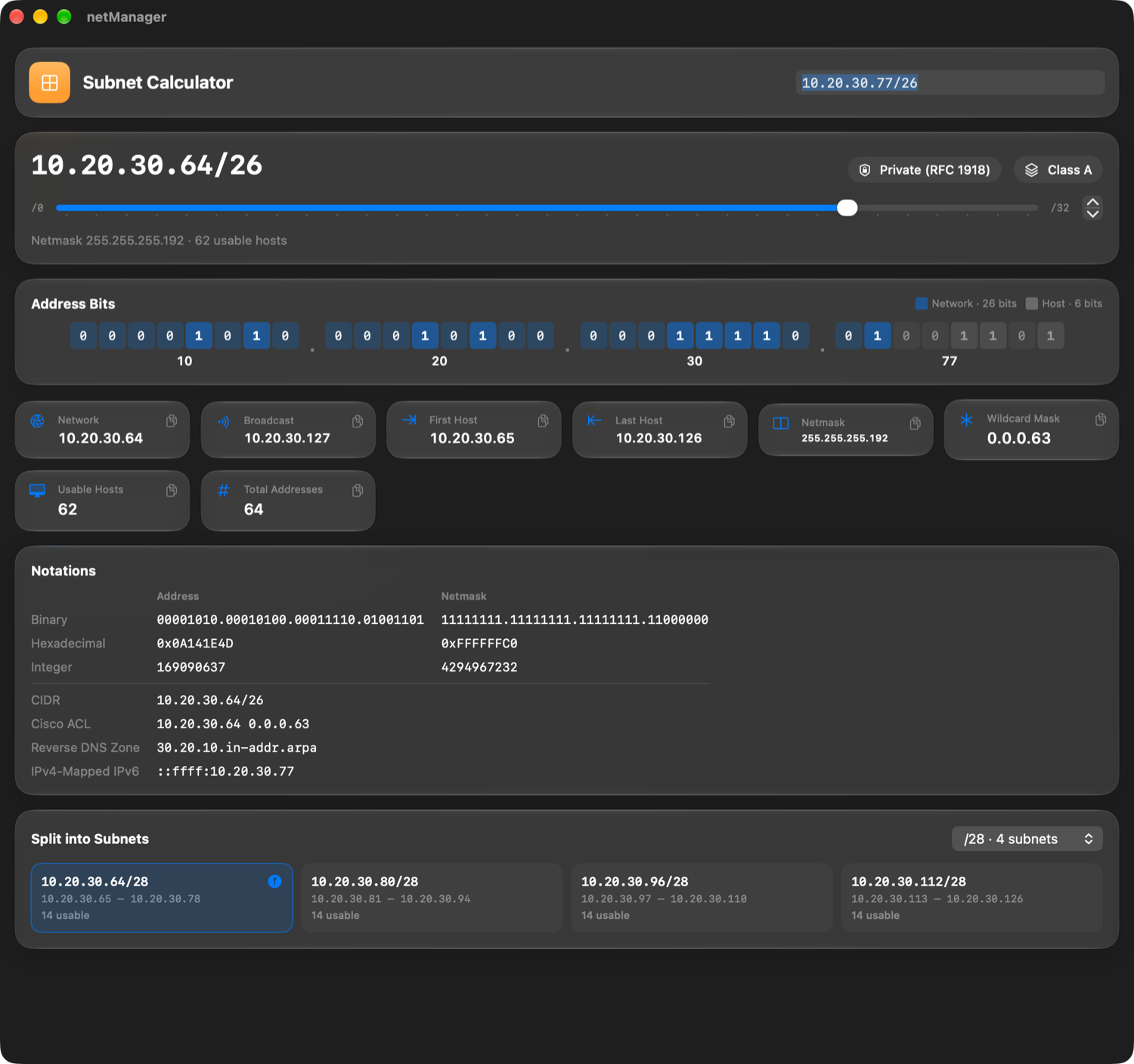
Native, fast, and beautiful — each one turns raw output into something you can read at a glance.

Ping, with a pulse.

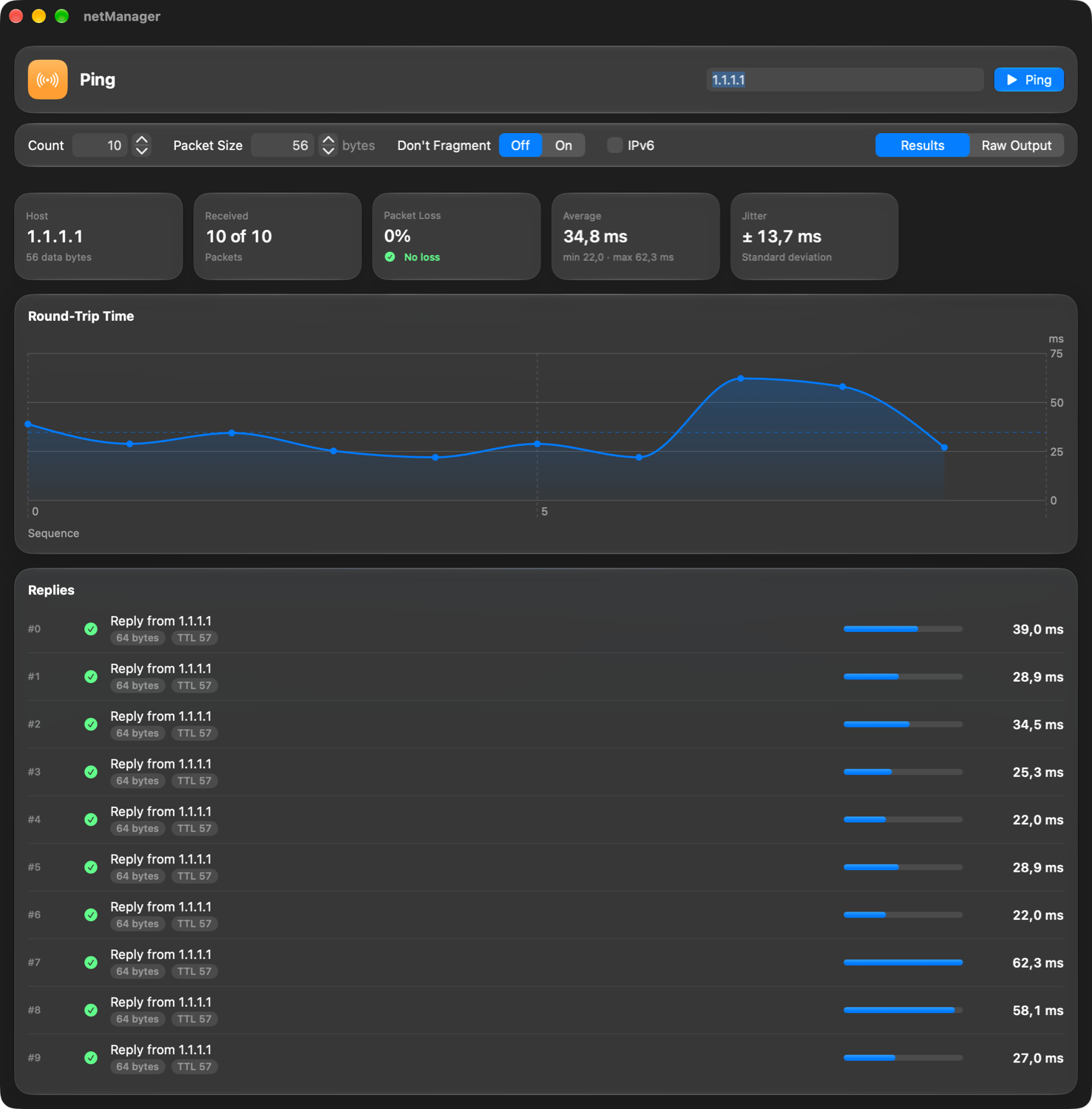
Live statistics, a latency chart with hover details, and a reply list that reads like a dashboard.

  • Packet size 1–9999 bytes and the Don't Fragment flag for MTU testing
  • Continuous mode — runs for hours without slowing down
  • Loss, average, min/max and jitter at a glance
netManager Ping tool showing 10 of 10 replies from 1.1.1.1, 0% loss, 34.8 ms average, a round-trip time chart and a reply list.

Security & sync

Encrypted before it
ever touches the disk.

Every name, host, user name, password, key and template is sealed with AES-256-GCM — on your Mac and in iCloud.

Keys stay in the Keychain

The 256-bit key lives in iCloud Keychain, so your Macs share it — and nothing else can read your data. A key fingerprint lets you compare.

Synced through iCloud

SwiftData and CloudKit keep connections, credentials, templates and folders in sync across your Macs — in your private database.

Touch ID app lock

Optionally require Touch ID or your password at launch. Revealing or replacing the key always asks first.

No accounts. No tracking.

No sign-up, no analytics, no servers of ours. Your network data goes to your devices and your iCloud — nowhere else.

0protocols — SSH, SFTP, SCP, FTP
0native network tools
0bit AES-GCM field encryption
0folder levels to organize everything

Keyboard first

Your hands never
leave the keyboard.

FAQ

Good questions.

Does it work with older switches, routers and firewalls?

Yes. Turn on “Enable Legacy Algorithms” for a connection and netManager adds SHA-1 key exchange, ssh-rsa host keys and CBC ciphers — limited to what your Mac's OpenSSH supports. For SCP, it uses the classic protocol network devices expect.

Can I keep using my SSH keys, agent and ~/.ssh/config?

Absolutely. netManager runs the OpenSSH built into macOS, so your existing configuration, keys and agent work as they always have. You can also store keys as encrypted credentials.

Where are my passwords stored?

In netManager's own database, encrypted field by field with AES-256-GCM. The key lives in iCloud Keychain. If you enable iCloud sync, only the encrypted values are uploaded to your private CloudKit database.

Do I need an account?

No. There's no sign-up and no tracking. iCloud sync uses the Apple Account you're already signed in with — and it's optional.

Which macOS version do I need?

macOS 26.6 or later. The app is designed for the Liquid Glass look and supports light and dark appearance.

Ready when
your network is.

Download netManager and connect to your first device in under a minute.

Download for Mac